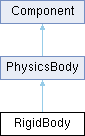
The RigidBody is a type of PhysicsBody. The main difference between RigidBody and any other physics bodies is that it moves according to the physics simulation, and can be affected by forces, impulses, and collisions.
Like any other physics body, once it is attached to a node, you must not move the node through its transform property but through the setPosition() and setAngle() functions of the physics body.
Example usage:
std::shared_ptr<Node> myNode = std::make_shared<Node>();
std::shared_ptr<Shape> myShape = std::make_shared<CircleShape>(20.0f);
std::shared_ptr<RigidBody> rigidBody = std::make_shared<RigidBody>(myShape);
myNode->addComponent(rigidBody);
myNode->addComponent(std::make_shared<ShapeSprite>(myShape));
rigidBody->setPosition(
Vector2{100.0f, 100.0f});
Definition definitions.hpp:77
Functions and usages
You can apply forces and impulses:
rigidBody->applyforce({1.0f, 0.0f});
rigidBody->applyImpulse({1.0f, 0.0f});
You can also set its linear velocity. Instead of setting its position every frame, if you have something like a player controller you should instead use setLinearVelocity():
Vector2 velocity = rigidBody->getLinearVelocity();
rigidBody->setLinearVelocity(
Vector2{moveDirection, velocity.
y});
float y
Definition definitions.hpp:79
You can check if a rigidBody is on the ground by using the isOnGround() function:
Vector2 velocity = rigidBody->getLinearVelocity();
rigidBody->setLinearVelocity(
Vector2{velocity.
x, velocity.
y - 5});
}
float x
Definition definitions.hpp:78
For more information regarding a player controller, check out the platformer example!
You can also lock its rotation:
rigidBody->lockRotation(true);
This would be used in something like a top-down character controller, where you dont want your player rotating during collisions and other stuff. For more information regarding a top-down player controller, check out the top down example!
For more insight regarding anything physics related, the physics example and node tree example also utilize rigidbodies!

 Public Member Functions inherited from PhysicsBody
 1.9.8
1.9.8