Calamity Engine 1.0.0
A cross-platform 2D game engine written in C++ and SDL3.
Loading...
Searching...
No Matches
RigidBody Class Reference

#include <physics.hpp>

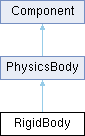
Inheritance diagram for RigidBody:
PhysicsBody Component

Public Member Functions

 RigidBody ()
 
 RigidBody (const std::shared_ptr< Shape > &shape)
 
void physicsUpdate () override
 
void initCompute () override
 
void setPosition (Vector2 pos) const
 
void setAngle (float angle) const
 
void setLinearVelocity (Vector2 vel) const
 
void applyForce (Vector2 force) const
 
void applyImpulse (Vector2 impulse) const
 
bool isOnGround ()
 
void lockRotation (bool value)
 
Vector2 getLinearVelocity () const
 
template<class Archive >
void save (Archive &ar) const
 
template<class Archive >
void load (Archive &ar)
 
- Public Member Functions inherited from PhysicsBody
void exit () override
 
void initialize () override
 
template<class Archive >
void save (Archive &ar) const
 
template<class Archive >
void load (Archive &ar)
 
b2BodyId getBodyId ()
 
b2ShapeId getShapeId ()
 
- Public Member Functions inherited from Component
virtual ~Component ()=default
 
virtual void update (float deltaTime)
 
virtual void render (std::shared_ptr< Window > window)
 
virtual void input (InputEvent &event)
 
virtual void postLoad ()
 
NodegetNode () const
 
void setNode (Node *n)
 
template<class Archive >
void save (Archive &ar) const
 
template<class Archive >
void load (Archive &ar)
 

Additional Inherited Members

- Public Attributes inherited from PhysicsBody
Signal< PhysicsBody * > collisionEnter
 
Signal< PhysicsBody * > collisionExit
 
Signal< PhysicsBody * > collisionHit
 
Signal mouseEntered
 
Signal mouseExited
 
std::shared_ptr< Shapeshape
 
- Protected Attributes inherited from PhysicsBody
bool sensor
 
b2BodyDef bodyDef
 
b2BodyId bodyId
 
b2ShapeId shapeId
 
Transform storedTransform
 

Detailed Description

RigidBody

The RigidBody is a type of PhysicsBody. The main difference between RigidBody and any other physics bodies is that it moves according to the physics simulation, and can be affected by forces, impulses, and collisions.

Like any other physics body, once it is attached to a node, you must not move the node through its transform property but through the setPosition() and setAngle() functions of the physics body.

Example usage:

std::shared_ptr<Node> myNode = std::make_shared<Node>();
std::shared_ptr<Shape> myShape = std::make_shared<CircleShape>(20.0f); // Create a circle with a 20 pixel radius
std::shared_ptr<RigidBody> rigidBody = std::make_shared<RigidBody>(myShape);
myNode->addComponent(rigidBody);
myNode->addComponent(std::make_shared<ShapeSprite>(myShape)); // also add a ShapeSprite for rendering!
// later on, after the node is initialized, you can move the rigid body:
rigidBody->setPosition(Vector2{100.0f, 100.0f});
Definition definitions.hpp:77

Functions and usages

You can apply forces and impulses:

rigidBody->applyforce({1.0f, 0.0f});
rigidBody->applyImpulse({1.0f, 0.0f});

You can also set its linear velocity. Instead of setting its position every frame, if you have something like a player controller you should instead use setLinearVelocity():

Vector2 velocity = rigidBody->getLinearVelocity();
rigidBody->setLinearVelocity(Vector2{moveDirection, velocity.y});
float y
Definition definitions.hpp:79

You can check if a rigidBody is on the ground by using the isOnGround() function:

if(rigidBody->isOnGround() && Input.isActionJustPressed("jump")) {
Vector2 velocity = rigidBody->getLinearVelocity();
rigidBody->setLinearVelocity(Vector2{velocity.x, velocity.y - 5});
}
Definition input.hpp:256
bool isActionJustPressed(const std::string &name) const
Definition input.cpp:532
float x
Definition definitions.hpp:78

‍For more information regarding a player controller, check out the platformer example!

You can also lock its rotation:

rigidBody->lockRotation(true);

This would be used in something like a top-down character controller, where you dont want your player rotating during collisions and other stuff. For more information regarding a top-down player controller, check out the top down example!

For more insight regarding anything physics related, the physics example and node tree example also utilize rigidbodies!

Constructor & Destructor Documentation

◆ RigidBody() [1/2]

RigidBody::RigidBody ( )

◆ RigidBody() [2/2]

RigidBody::RigidBody ( const std::shared_ptr< Shape > &  shape)
explicit

Member Function Documentation

◆ applyForce()

void RigidBody::applyForce ( Vector2  force) const

◆ applyImpulse()

void RigidBody::applyImpulse ( Vector2  impulse) const

◆ getLinearVelocity()

Vector2 RigidBody::getLinearVelocity ( ) const

◆ initCompute()

void RigidBody::initCompute ( )
overridevirtual

Reimplemented from PhysicsBody.

◆ isOnGround()

bool RigidBody::isOnGround ( )

◆ load()

template<class Archive >
void RigidBody::load ( Archive &  ar)
inline

◆ lockRotation()

void RigidBody::lockRotation ( bool  value)

◆ physicsUpdate()

void RigidBody::physicsUpdate ( )
overridevirtual

Implements PhysicsBody.

◆ save()

template<class Archive >
void RigidBody::save ( Archive &  ar) const
inline

◆ setAngle()

void RigidBody::setAngle ( float  angle) const

◆ setLinearVelocity()

void RigidBody::setLinearVelocity ( Vector2  vel) const

◆ setPosition()

void RigidBody::setPosition ( Vector2  pos) const

The documentation for this class was generated from the following files: